How to Register a MILWAUKEE Warranty in Thailand | Latest Update
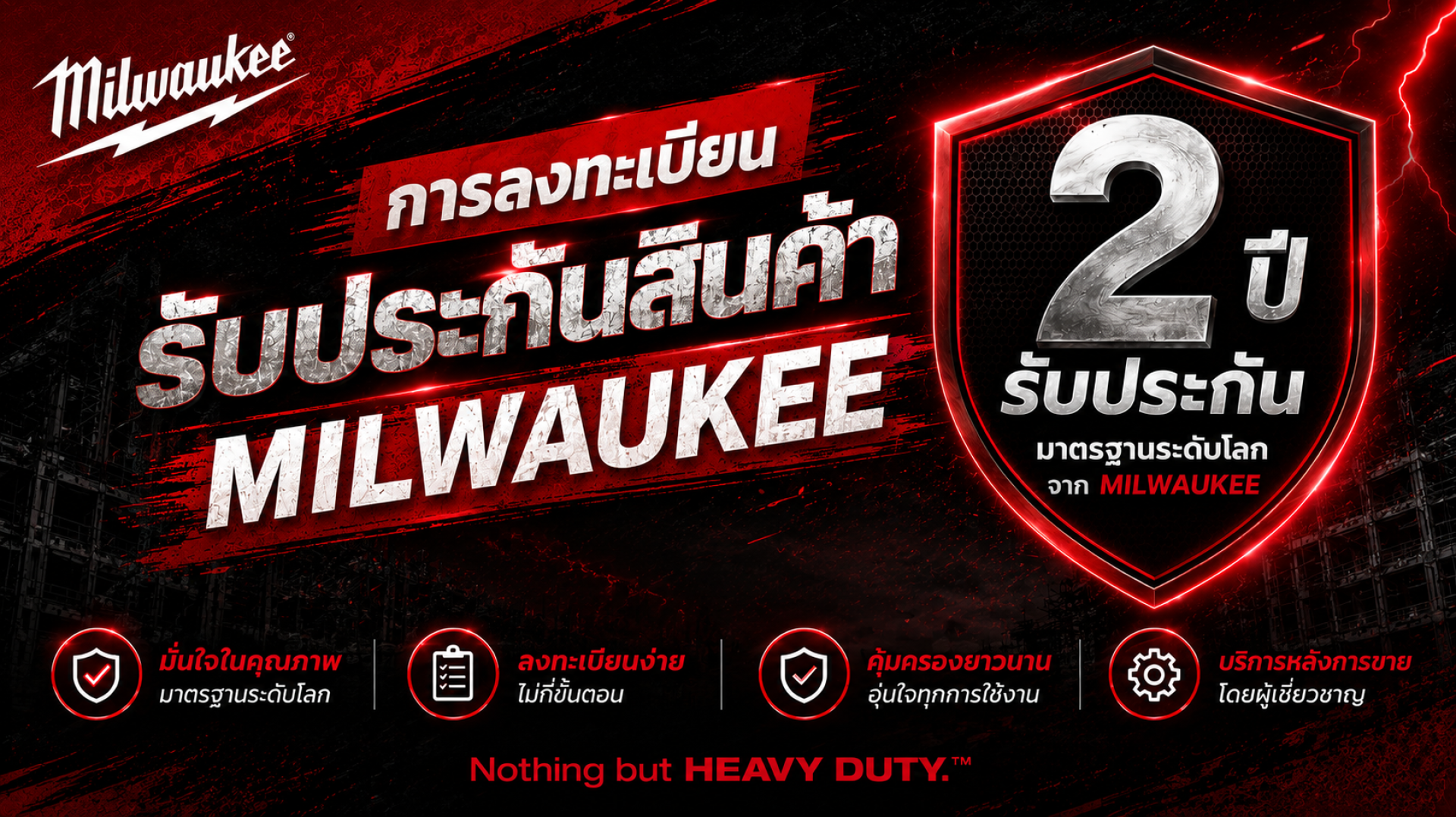
If you've recently purchased a MILWAUKEE power tool—whether it's a cordless drill, angle grinder, circular saw, oscillating multi-tool, battery, or charger—registering your product warranty is an important step you shouldn't overlook. Registering your product helps ensure you're covered under the official warranty provided by Milwaukee Tool Thailand and makes future repair or warranty claims more convenient.
The registration process takes only a few minutes, but it allows your product information to be stored in the system, making it faster and easier to verify your warranty status and receive service from authorized service centers. It also serves as confirmation of your product's warranty eligibility.
In this guide, you'll learn how to register your MILWAUKEE product warranty in Thailand step by step, along with important information, helpful tips, and answers to frequently asked questions—so you can use your tools with confidence and enjoy all the benefits available to you.
Why Should You Register Your MILWAUKEE Product Warranty?
Registering your MILWAUKEE product warranty ensures that your product information is securely recorded in the Milwaukee Tool Thailand system, making it easier to verify your product details and warranty status whenever you need service or support.
Benefits of Registering Your Warranty
- Receive official warranty coverage in accordance with Milwaukee Tool Thailand's warranty terms and conditions.
- Easily access your product information through the registration system.
- Reduce the time required for repairs or warranty claims.
- Keep a digital record of your purchase for future reference.
- Enjoy a more convenient service experience when contacting an authorized service center.
Recommendation: Register your product within 30 days of the purchase date to comply with the warranty registration requirements of Milwaukee Tool Thailand.
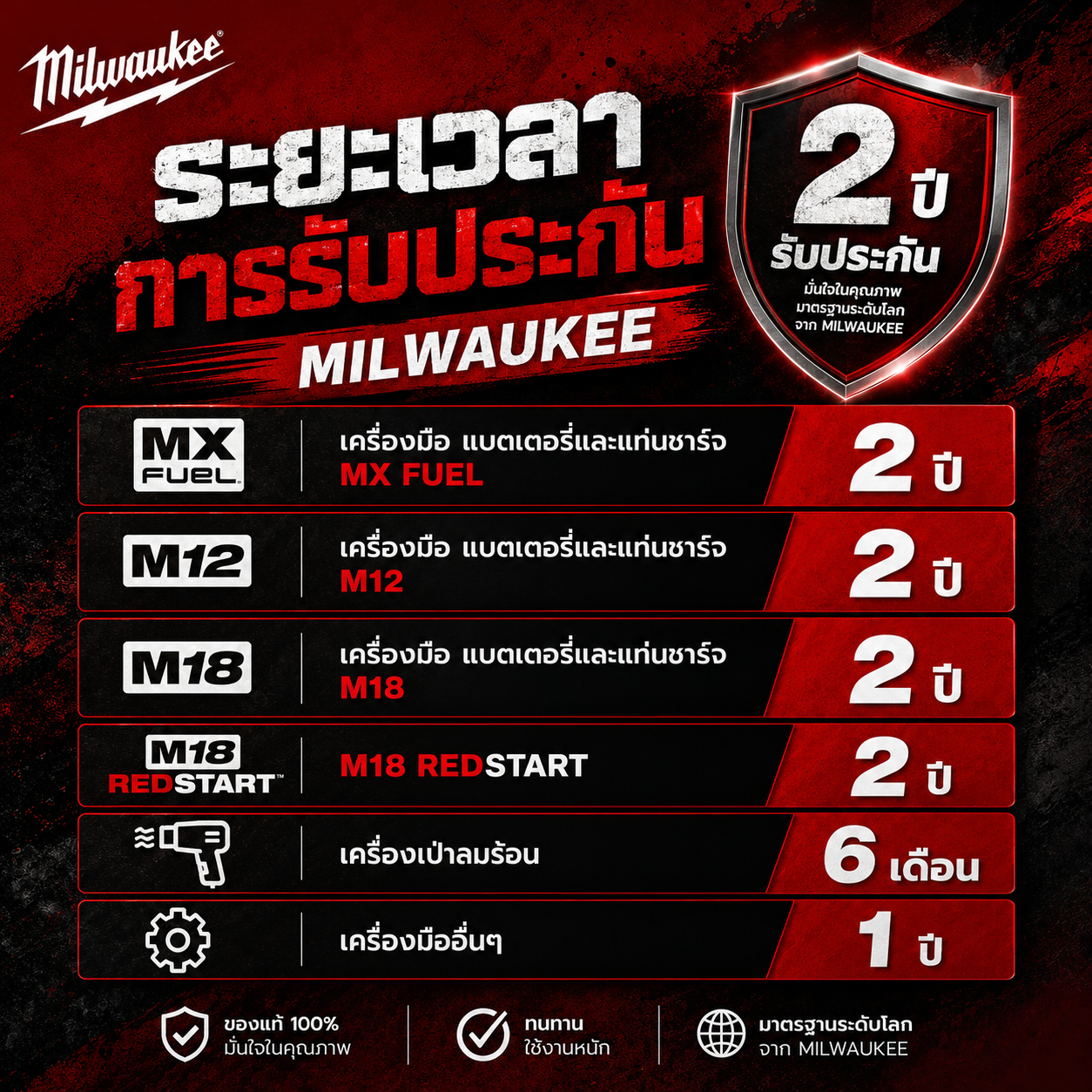
MILWAUKEE Product Warranty Period
MILWAUKEE is committed to delivering high-quality products and reliable after-sales service, giving users confidence in every job. Warranty coverage varies depending on the product category and begins from the original purchase date shown on the proof of purchase.
| Product Category | Warranty Period (From Date of Purchase) | Remarks |
| MX FUEL™ Tools, Batteries & Chargers | 2 Years | Eligible to extend the warranty by 1 additional year through the points redemption program. |
| M12™ Tools, Batteries & Chargers | 2 Years | Eligible to extend the warranty by 1 additional year through the points redemption program. |
| M18™ Tools, Batteries & Chargers | 2 Years | Eligible to extend the warranty by 1 additional year through the points redemption program. |
| M18 REDSTART | 2 Years | - |
| Heat Guns | 6 Months | Eligible to extend the warranty by 1 additional year through the points redemption program. |
| Other Tools | 1 Years | - |
Note: Warranty coverage begins on the original purchase date shown on the valid proof of purchase and is subject to the terms and conditions of MILWAUKEE Tool Thailand's Warranty Policy. Customers are encouraged to register their products and retain the original purchase receipt, as it may be required to verify warranty eligibility when requesting repair or warranty service.
How to Register Your MILWAUKEE Product Warranty
Step 1: Sign In to Register Your Product
If You Are Not Yet a Member
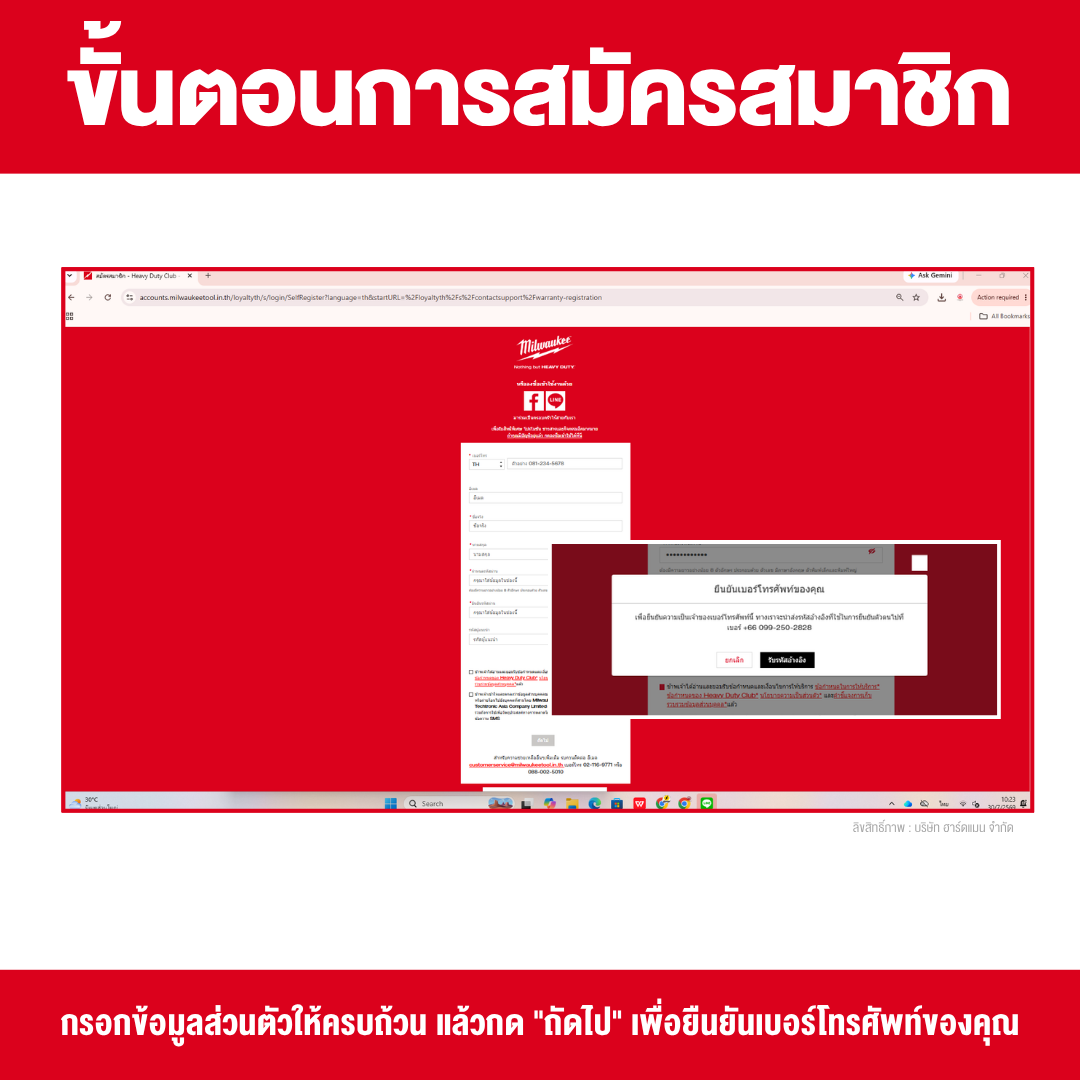
If you are a new customer or have never registered a MILWAUKEE product before, you must first sign up for a Heavy Duty Club account. Membership is required before you can register your product warranty and enjoy the exclusive benefits available to members. You can create a Heavy Duty Club account through the official website using one of the following two methods:
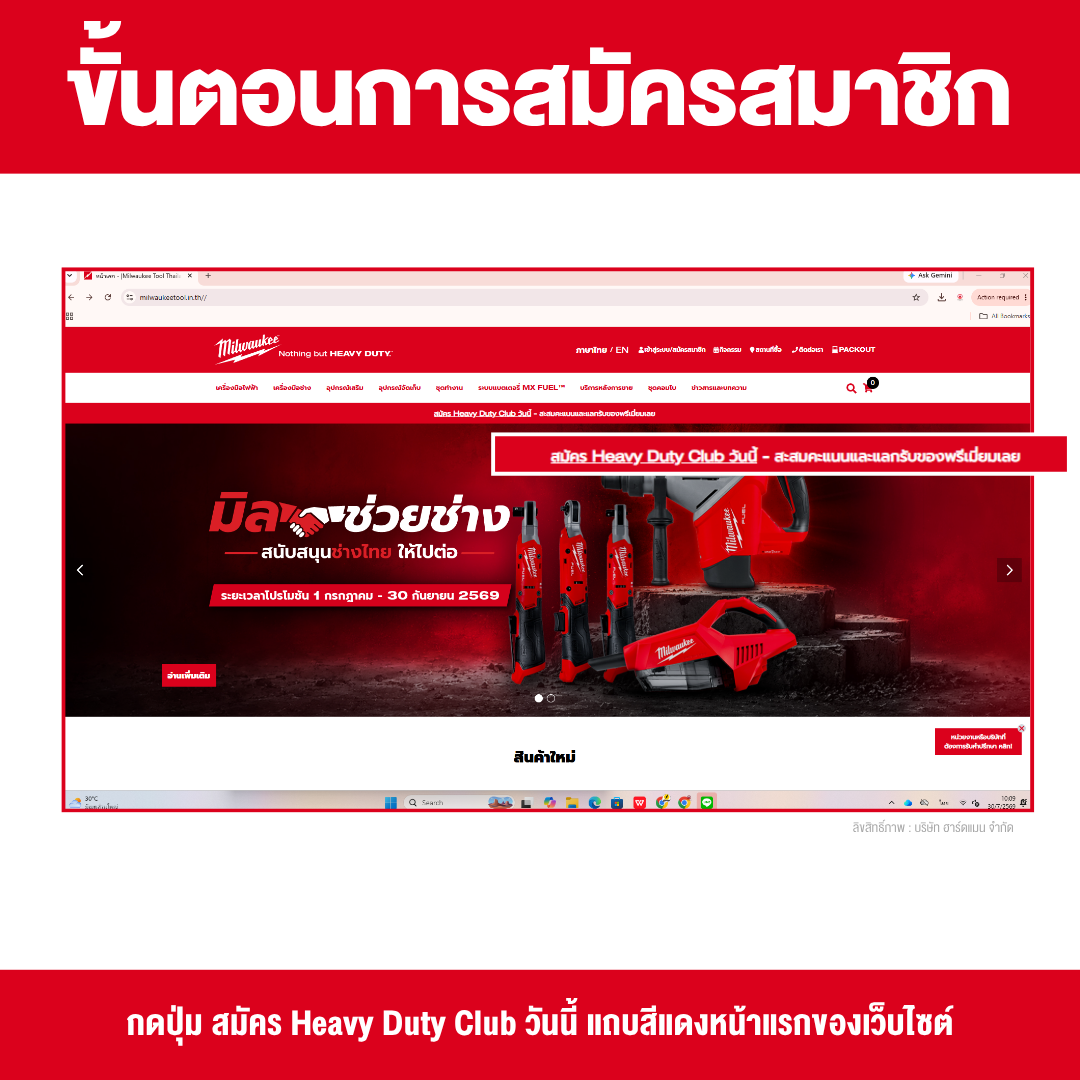
Method 1: Sign Up from the Website Homepage
- Visit www.milwaukeetool.in.th.
- Click the "Join Heavy Duty Club Today" button located in the red banner on the homepage.
- Complete the registration form by providing your personal information, including:
- Full Name
- Mobile Phone Number
- Email Address
- Password
- Full Name
- Review your information to ensure it is correct, then click "Next."
- Verify your mobile phone number by entering the One-Time Password (OTP) sent to your phone via SMS to complete your Heavy Duty Club membership registration.
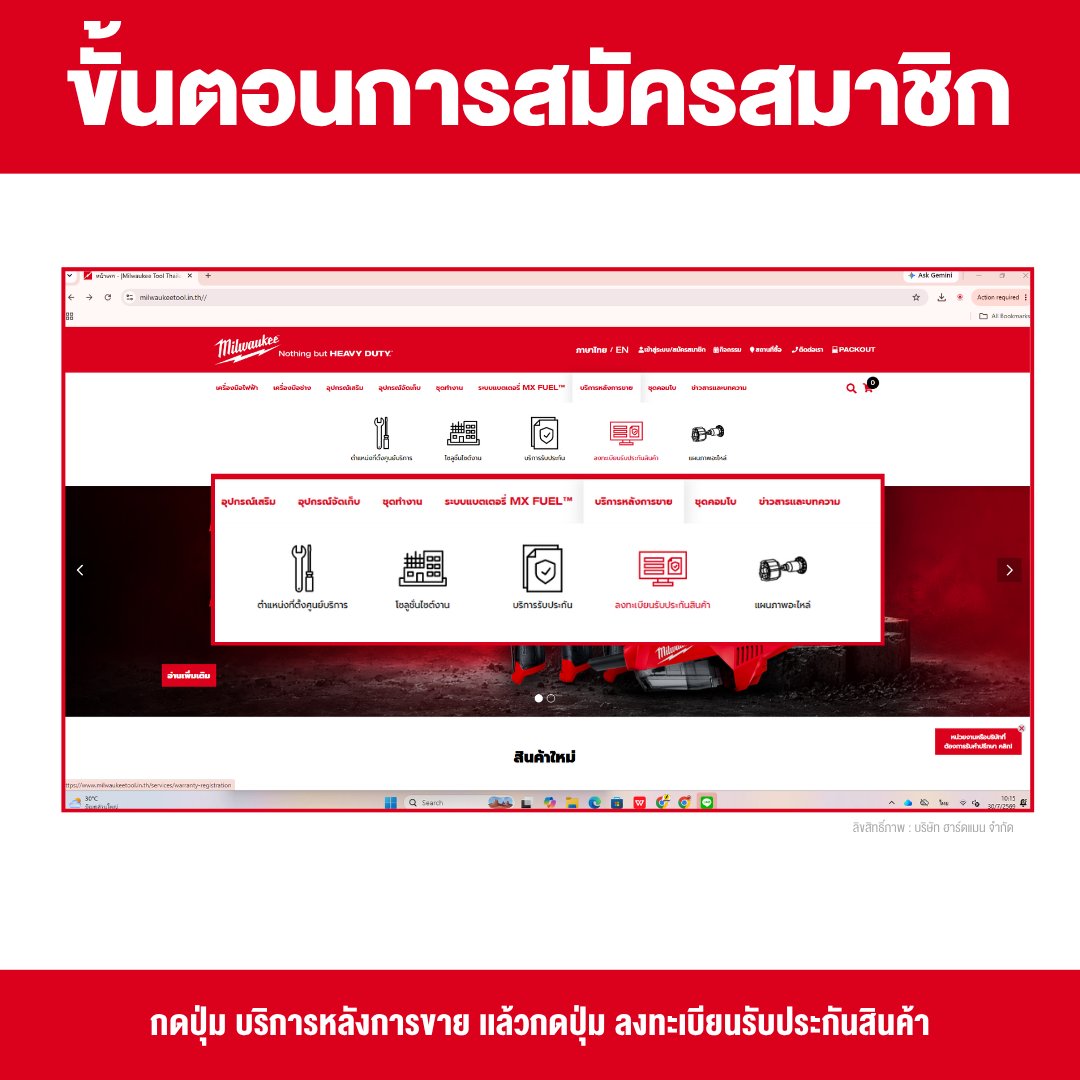
Method 2: Sign Up Through the Product Warranty Registration Page
- Visit www.milwaukeetool.in.th.
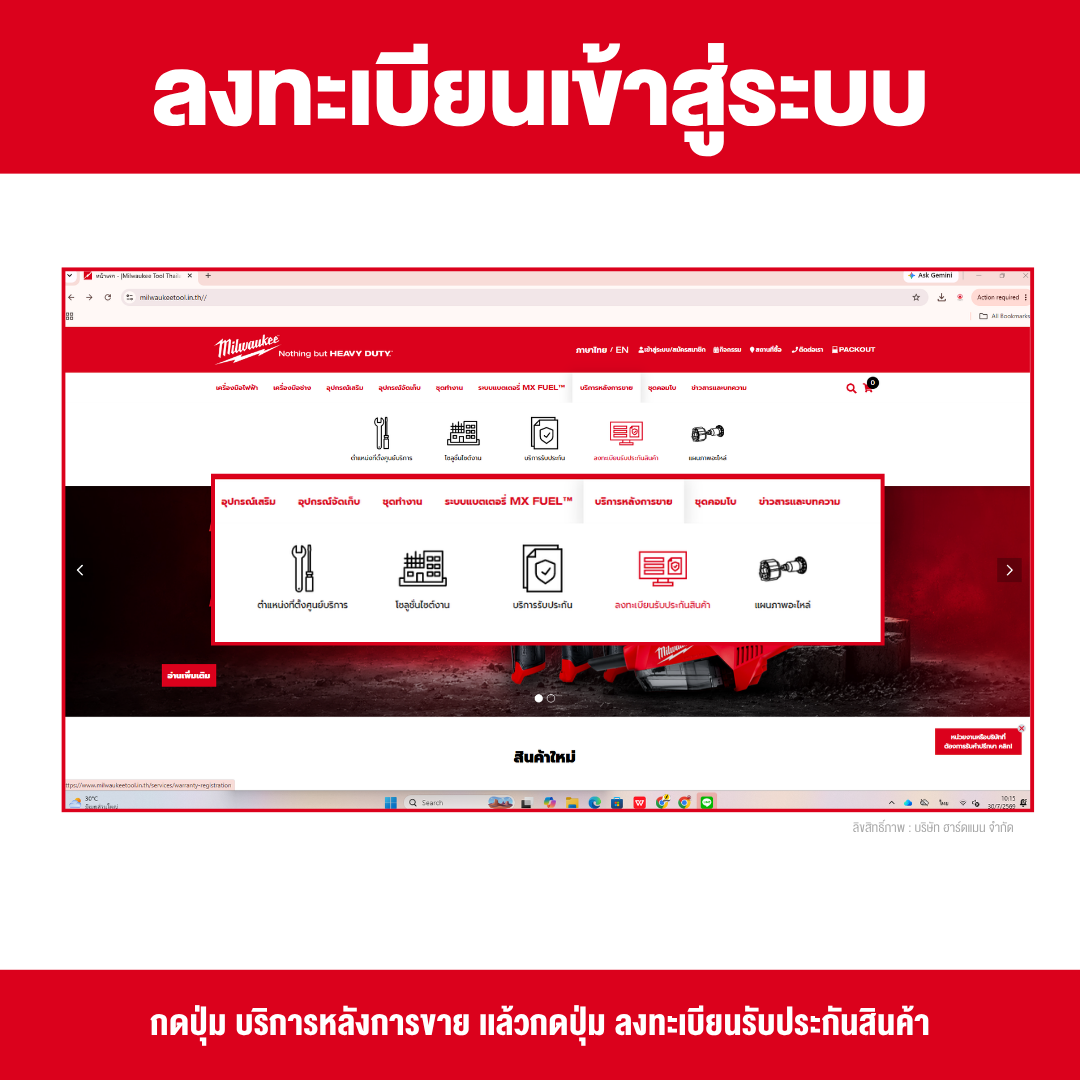
- Select the "After Sales Service" menu.
- Click "Product Warranty Registration."
- Select "Not a member yet? Sign Up."
- Complete the registration form by providing your personal information, including:
- Full Name
- Mobile Phone Number
- Email Address
- Password
- Full Name
- Review your information to ensure it is accurate, then click "Next."
- Verify your mobile phone number by entering the One-Time Password (OTP) sent via SMS to complete your Heavy Duty Club membership registration.
Note: Use a valid email address and mobile phone number, as they will be used for identity verification, account login, tracking your product warranty registrations, and receiving the latest news, promotions, and exclusive member benefits from the Heavy Duty Club.
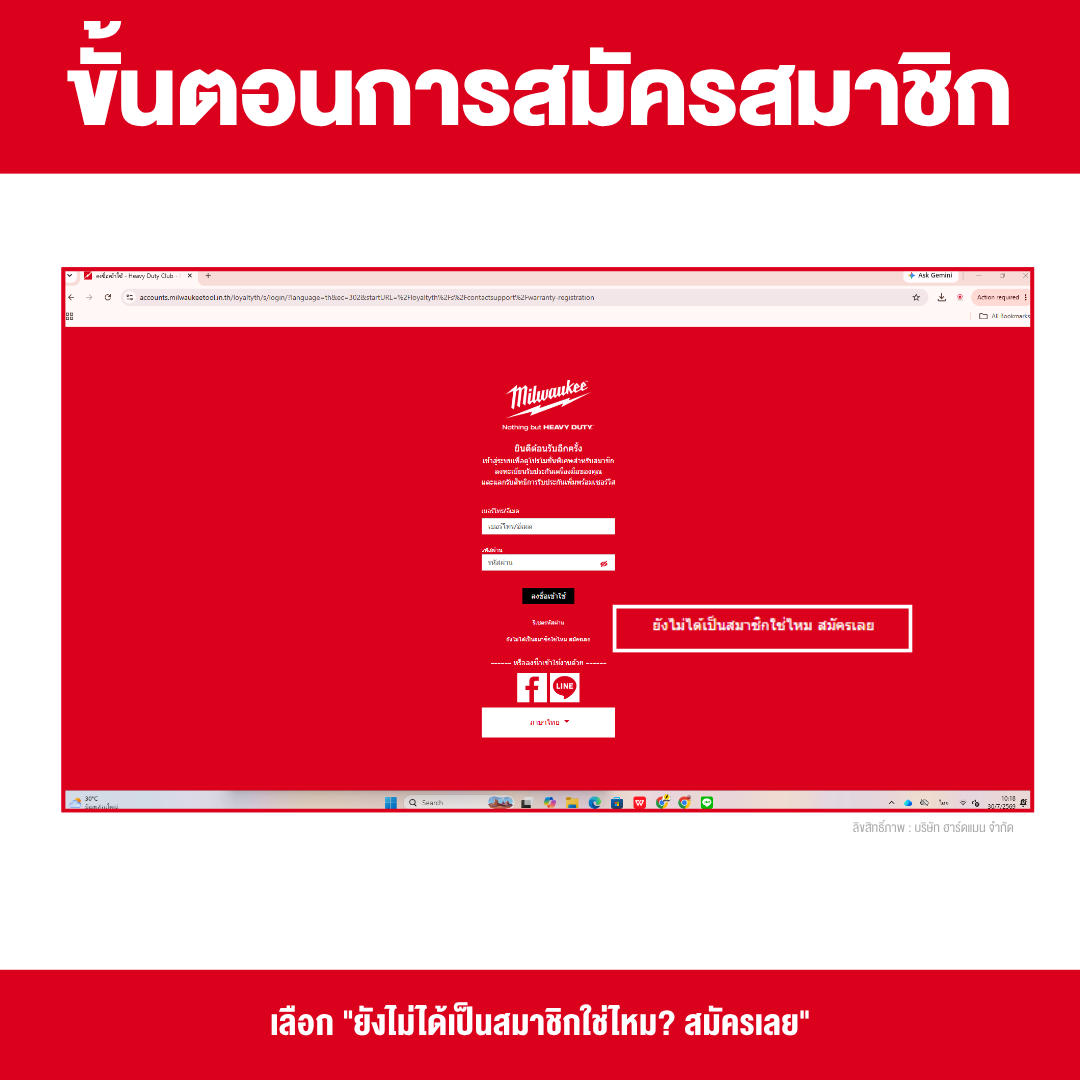
If You Already Have a Heavy Duty Club Account
If you are already a Heavy Duty Club member, you do not need to create a new account. Simply follow these steps:
- Visit www.milwaukeetool.in.th
- Select the "After Sales Service" menu.
- Click "Product Warranty Registration."
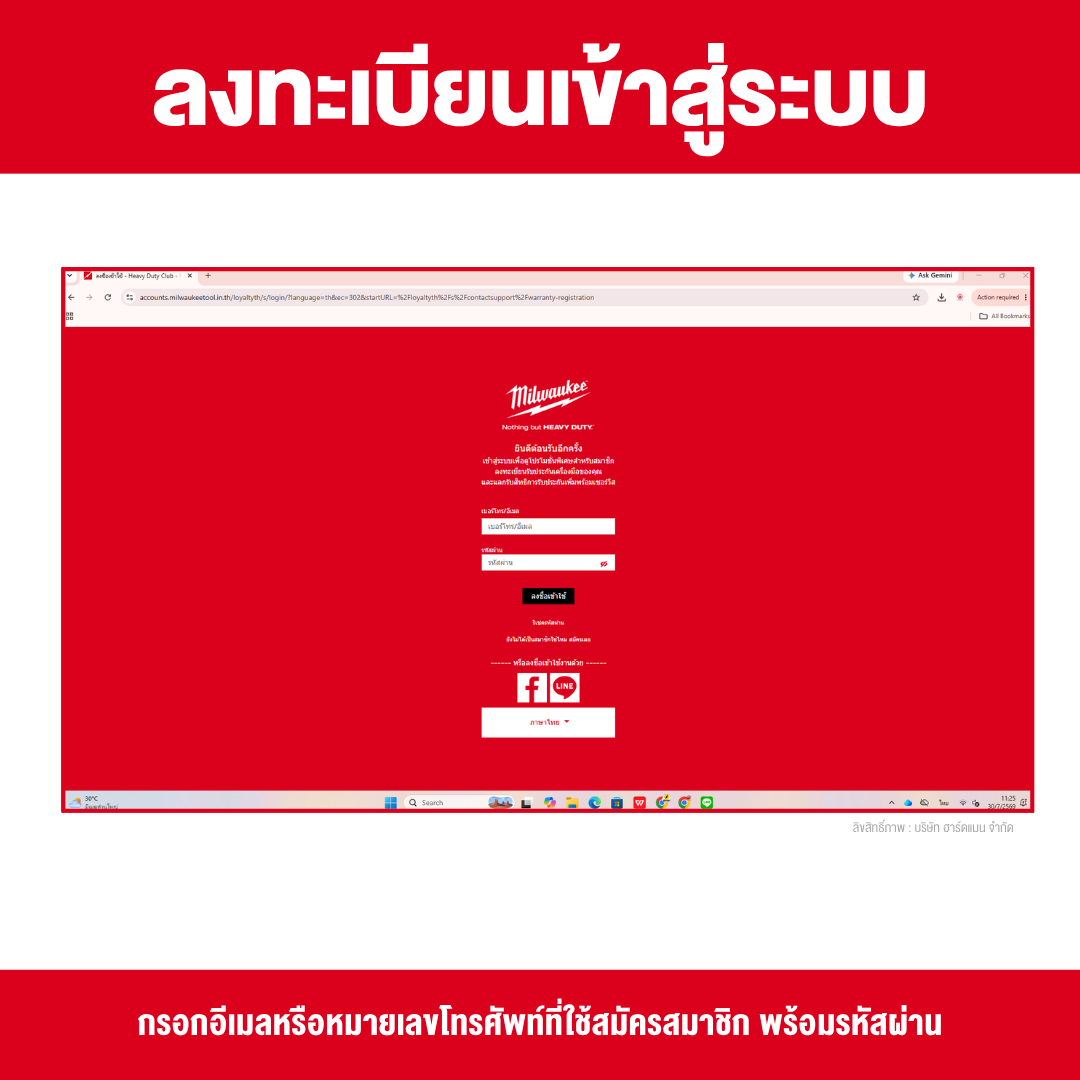
- Enter the email address or mobile phone number you used to register your Heavy Duty Club account, along with your password, then click "Sign In."
- Once you have successfully signed in, you can proceed directly to the next step to register your MILWAUKEE product warranty.
Step 2: Register Your MILWAUKEE Product Warranty
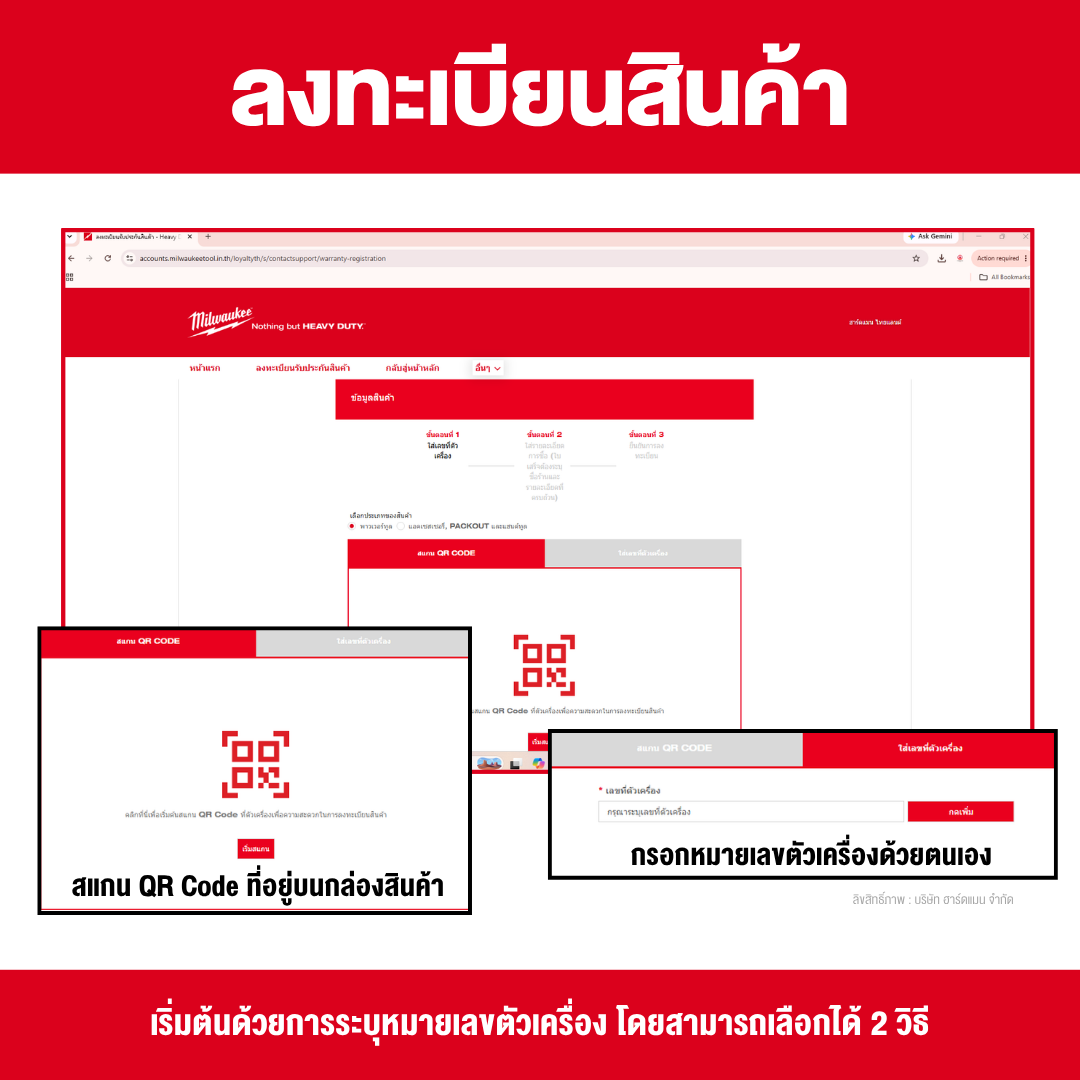
- Manually enter the Serial Number into the designated field.
- Scan the QR Code located on the product packaging to allow the system to automatically retrieve and fill in the Serial Number.
- Where Can I Find the Serial Number and Model Number?
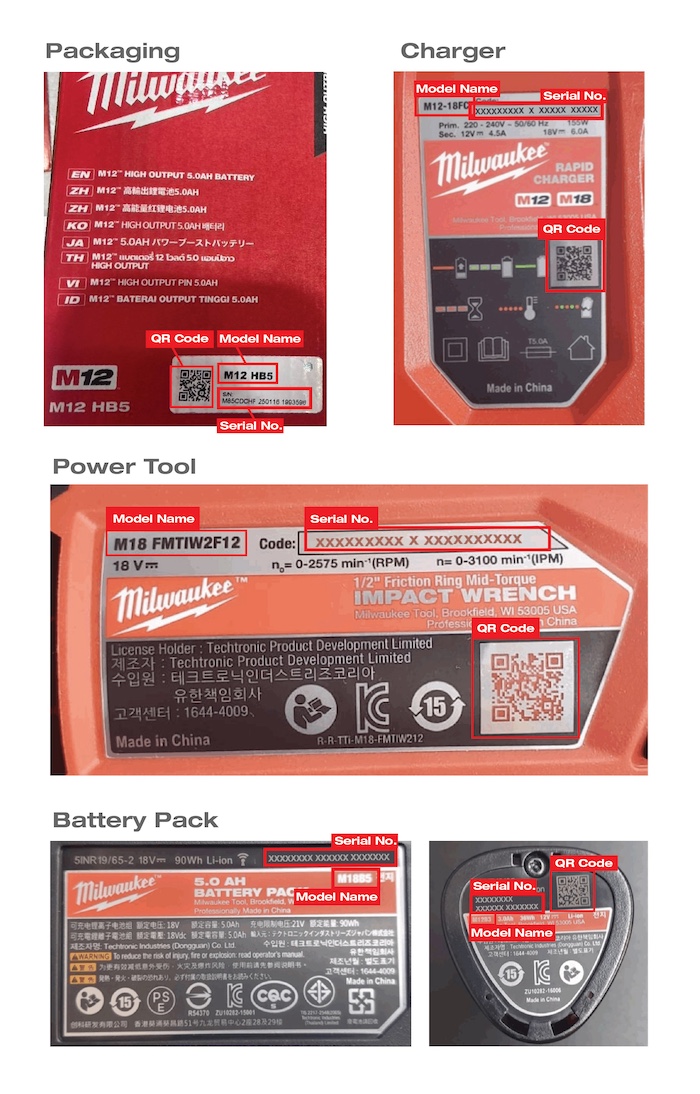
Note: QR code scanning is available only for MILWAUKEE power tools, batteries, and chargers. For accessories, PACKOUT™ storage products, and hand tools, you will need to manually enter the required product information as prompted by the registration system.
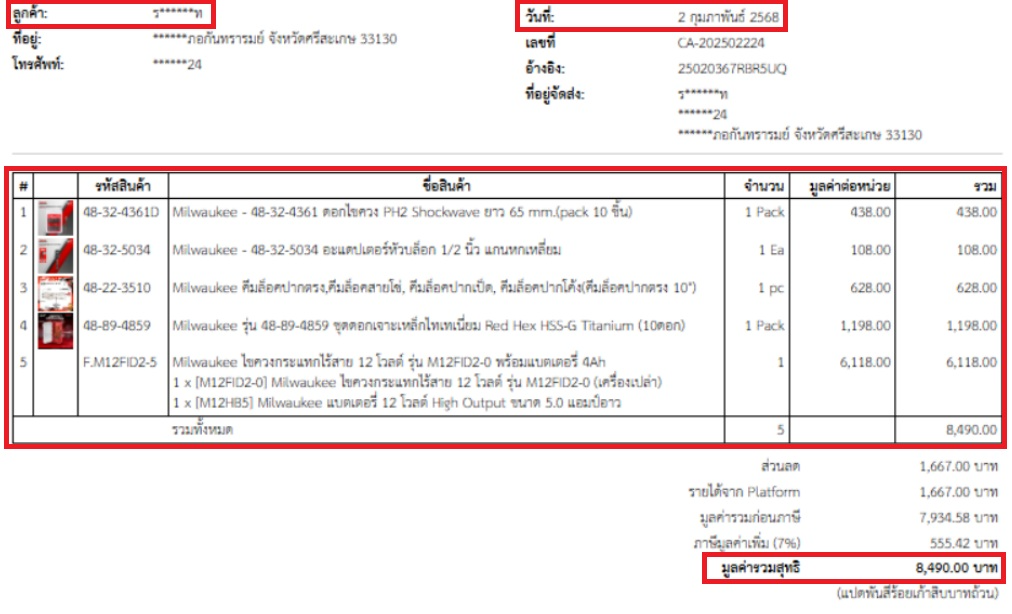
2. Enter Your Purchase Information
Complete the purchase details and upload your proof of purchase by providing the following information:
- Purchase Date
- Place of Purchase: Select Hardman Co., Ltd.
- Receipt Number
- Total Amount shown on the receipt
- Upload a copy of your sales receipt or tax invoice
Note: Your receipt or tax invoice must clearly display the store name, purchase date, product details, and total purchase amount. This document is required as proof of purchase to verify your product's warranty eligibility.
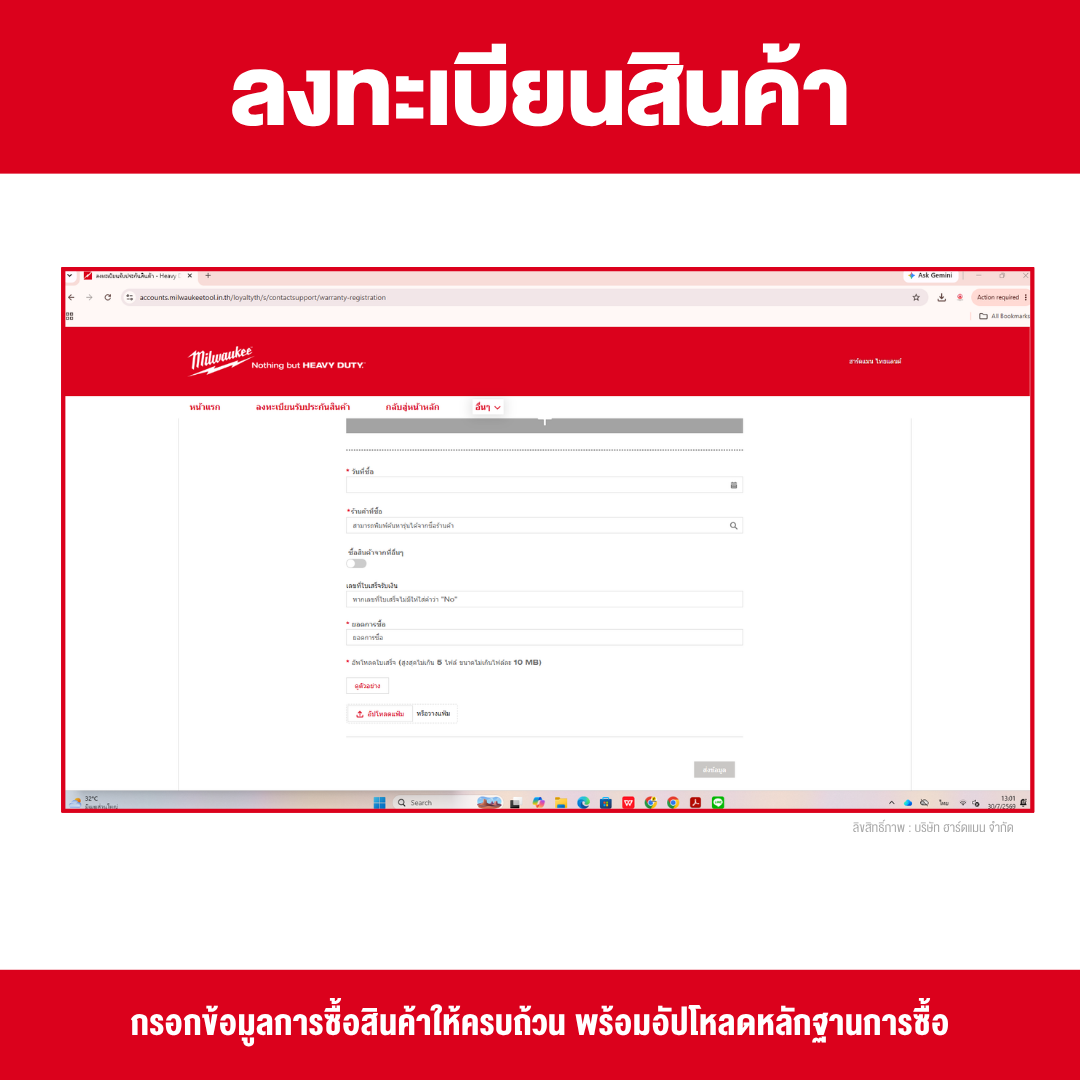
Sample Sales Receipt / Tax Invoice
3. Confirm Your Registration
After entering your product information, purchase details, and uploading your proof of purchase, the system will display a Registration Summary page. Carefully review all the information to ensure it is accurate before submitting your registration.
Please verify the following details:
- Serial Number
- Purchase Date
- Place of Purchase
- Receipt Number
- Total Amount shown on the receipt
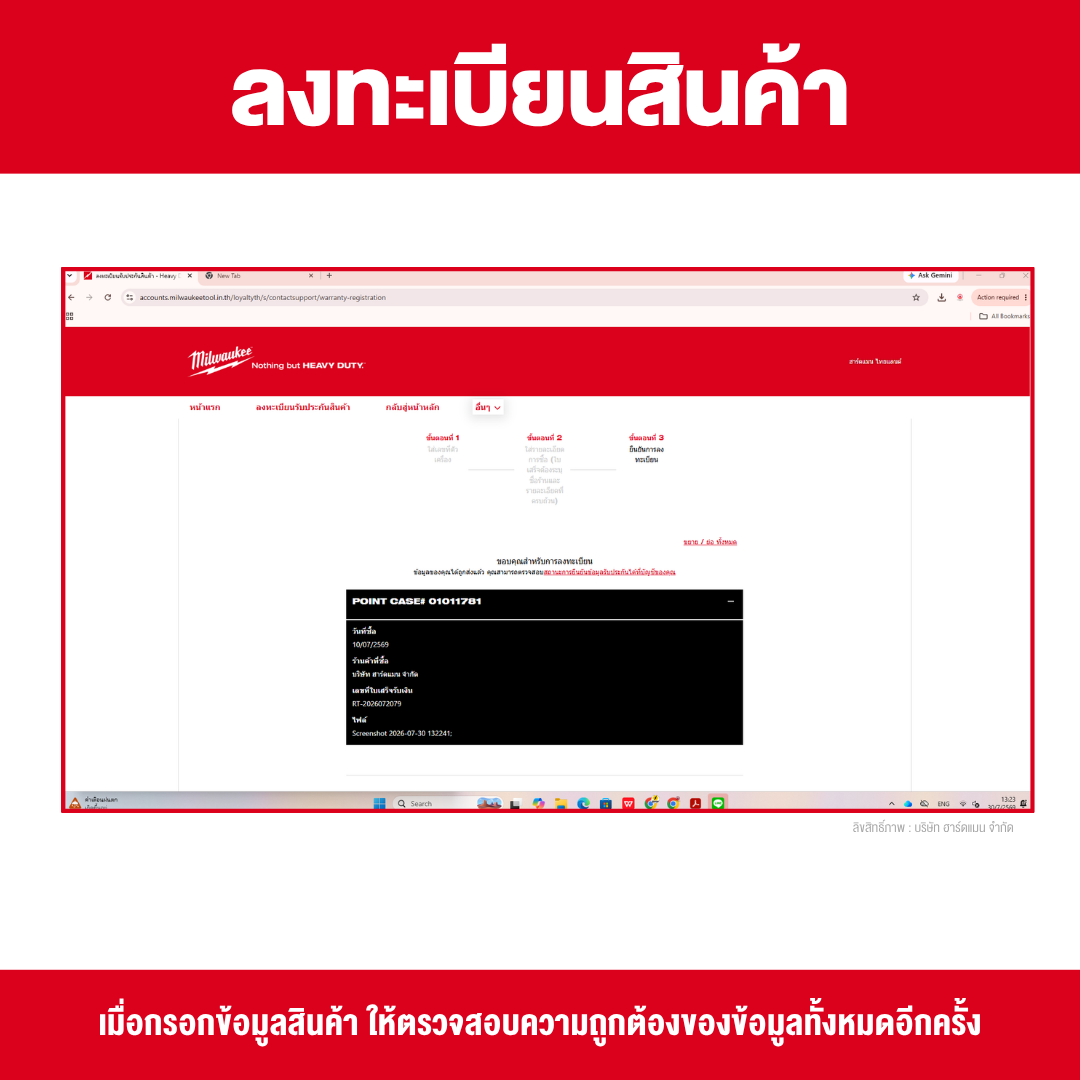
If all the information is correct, the product warranty registration process is complete. No further action is required, and your product will be saved to your Heavy Duty Club account for checking your warranty status and receiving after-sales service in the future.
MILWAUKEE Product Warranty Terms and Conditions
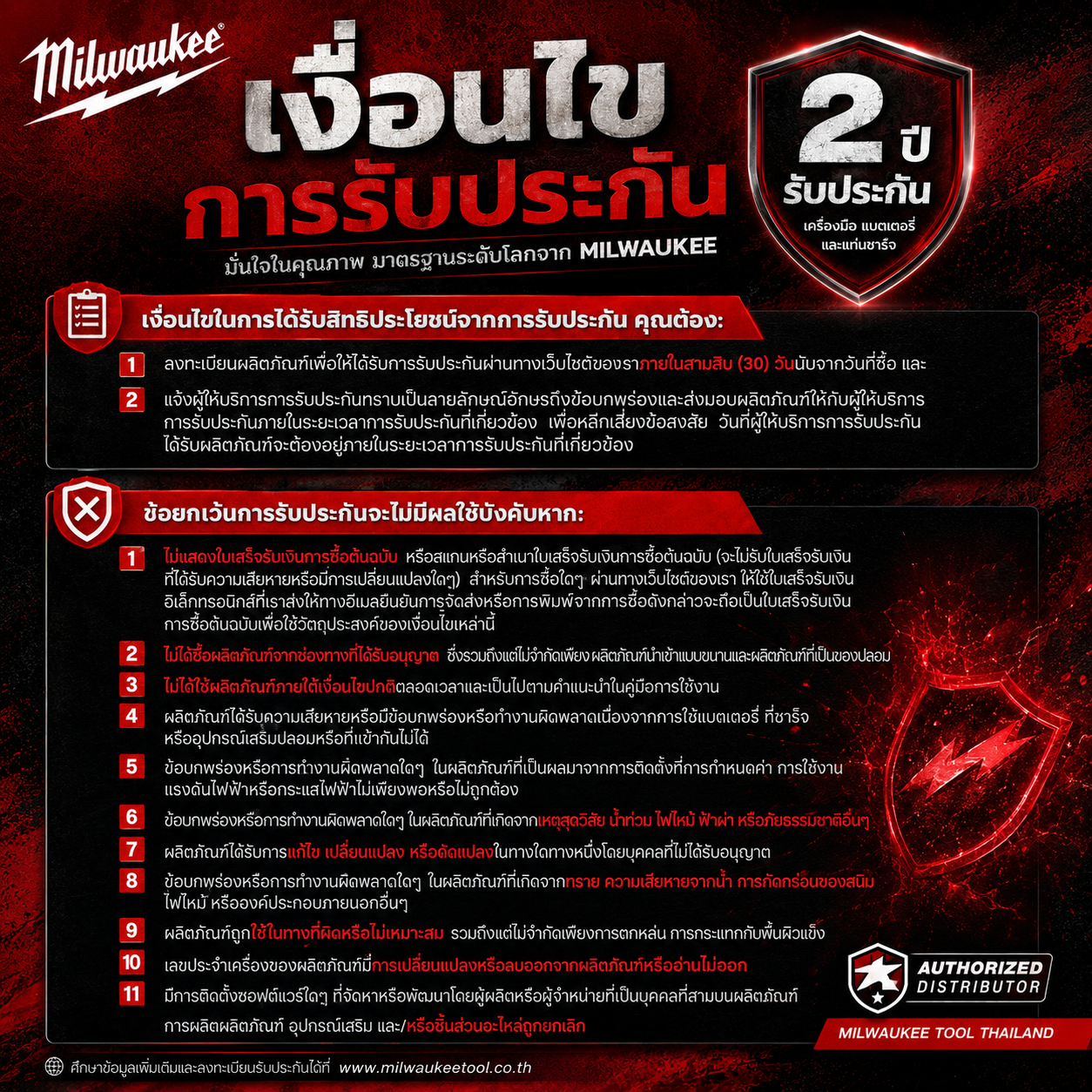
To be eligible for the MILWAUKEE product warranty, customers must comply with the following conditions:
Warranty Eligibility Requirements
- Register your product through the website within 30 days from the date of purchase.
- If the product has a defect or malfunction, you must notify the warranty service provider in writing and submit the product for inspection within the applicable warranty period.
- The product must be received by the warranty service provider before the warranty period expires.
Situations Where the Warranty Does Not Apply
The warranty will be void or may be denied under the following circumstances:
1. Invalid Proof of Purchase
- The original purchase receipt is not provided.
- The receipt is damaged, altered, tampered with, or contains incomplete information.
- For products purchased online, an electronic receipt (E-Receipt) or the order confirmation email must be provided as proof of purchase.
2. Products Purchased from Unauthorized Sources
The warranty does not cover products purchased from unauthorized sources, including:
- Parallel imports
- Counterfeit or imitation products
- Dealers or sellers not authorized by MILWAUKEE
3. Improper Use
The warranty does not cover damage resulting from:
- Using the product for purposes other than its intended use
- Failure to follow the instructions in the user manual
- Operating the product beyond its specified capacity
4. Use of Non-Standard Accessories
The warranty does not cover damage caused by the use of:
Counterfeit batteries
Counterfeit chargers
Accessories or equipment that are incompatible with the product
5. Damage Caused by Misuse or Environmental Factors
The warranty does not cover damage resulting from:
- Improper installation or operation
- Incorrect voltage or electrical supply
- Floods, fire, lightning, or natural disasters
- Water, moisture, rust, sand, corrosion, or other external environmental factors
- Dropping, impact, or misuse of the product
6. Unauthorized Modification or Repair
The warranty will be void if:
- The product has been modified, altered, or repaired by unauthorized persons or service centers.
- The Serial Number has been removed, altered, or is unreadable.
- Unauthorized third-party software has been installed on the product.
7. Discontinued Products
Warranty service may not be available if the product, accessory, or related spare parts have been discontinued and replacement parts are no longer available.
Note: The purchase receipt must clearly show the store name, purchase date, product details, and total purchase amount as proof of purchase for warranty verification. Warranty service is subject to the terms and conditions of MILWAUKEE Tool Thailand. The company reserves the right to determine warranty eligibility based on the inspection results of an authorized service center, and the company's decision shall be final.
How to Check Your Product Registration Status
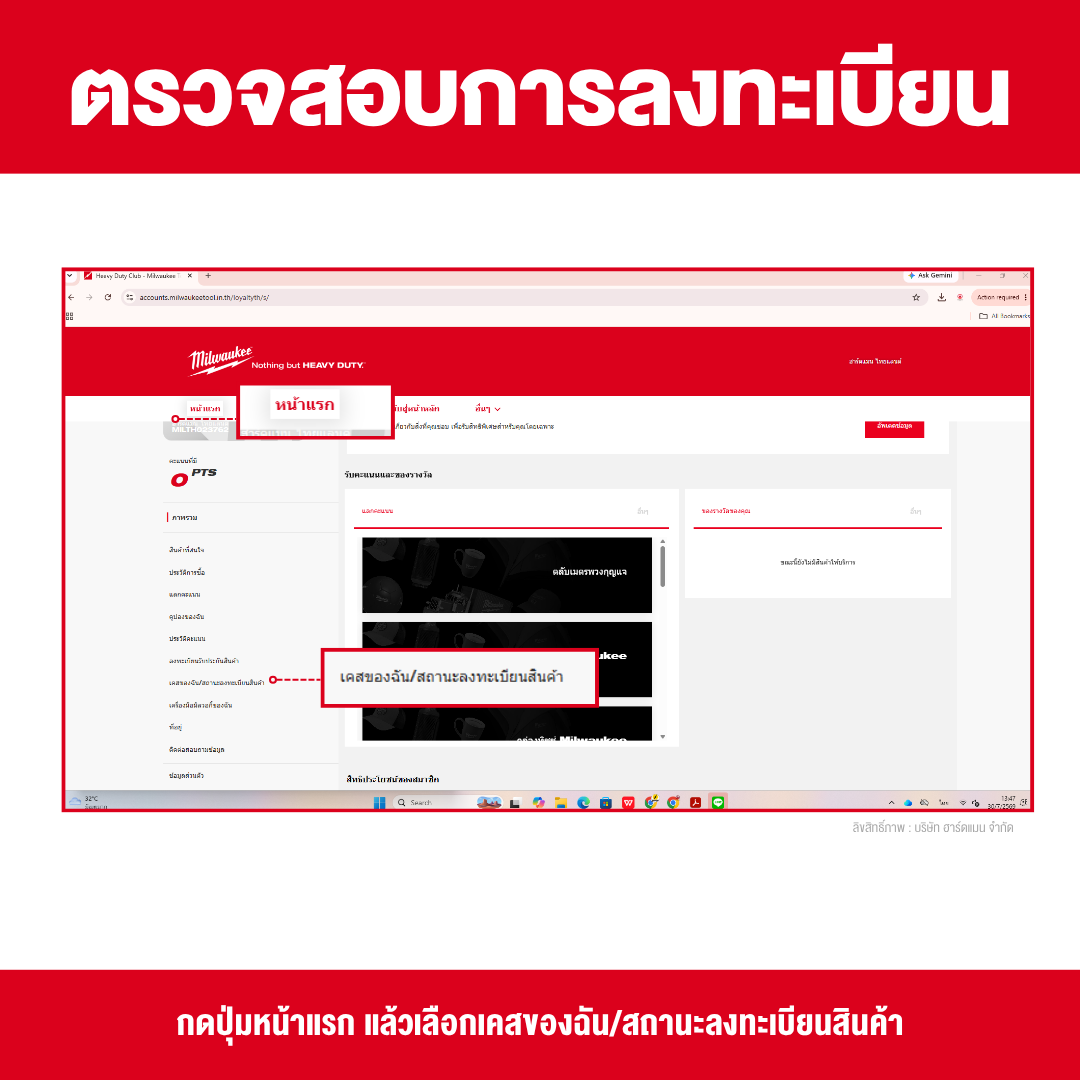
Once you have successfully registered your product warranty, you can check your registration status and warranty information at any time by following these steps:
- Visit www.milwaukeetool.in.th.
- Sign in to your Heavy Duty Club account.
- Click the "Home" menu.
- Select "My Cases / Product Registration Status."
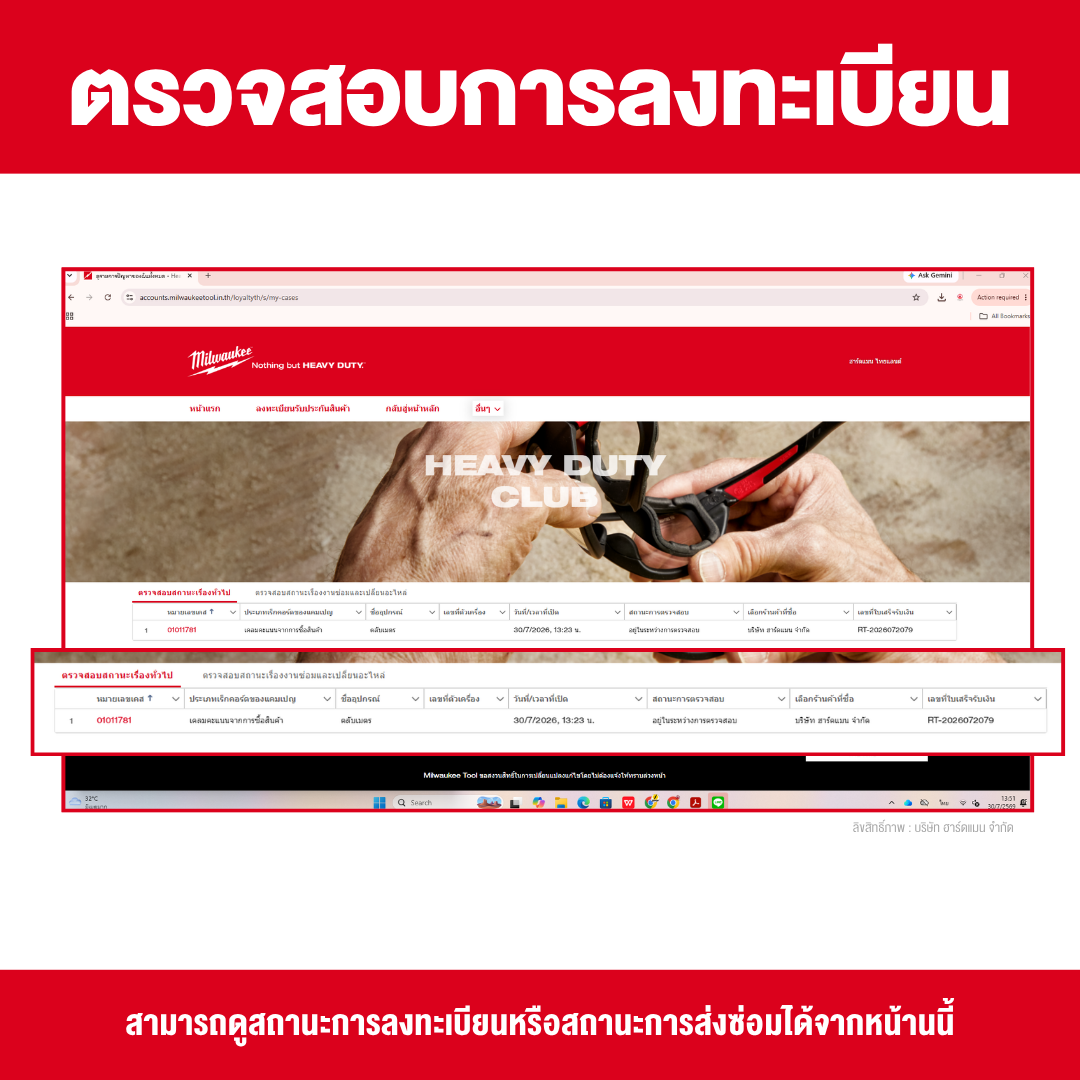
- The system will display a list of your registered products, including details such as:
- Product Name
- Serial Number
- Date/Time Opened
- Verification Status
- Place of Purchase
- Receipt Number
- Product Name
If your product appears in the system, it means your warranty registration has been successfully completed. You can use this information when requesting after-sales service or submitting a warranty claim in accordance with the applicable warranty terms and conditions.
Note: If you have registered your product but cannot find it in the system, first make sure you are signed in with the same Heavy Duty Club account used during registration. If the product still does not appear, please contact MILWAUKEE Customer Service and provide your Serial Number and proof of purchase for further assistance.
How Do I Make a Warranty Claim?
If your product develops a problem during the warranty period, you can contact Milwaukee Tool Thailand or reach us via LINE ID: @hardmanthailand. Please prepare the following:
- The product you wish to claim under warranty
- Original purchase receipt
- Product Serial Number
- Product registration information (if available)
Our service team will verify the warranty terms and conditions before proceeding with the repair or product replacement.
Frequently Asked Questions (FAQ)
Q: How soon after purchase should I register my product?
A: It is recommended to register your product within 30 days from the date of purchase.
Q: Can I make a warranty claim without a receipt?
A: It is recommended that you keep your purchase receipt or proof of purchase, as it may be required to verify your warranty eligibility.
Q: Do I need to register every product?
A: Yes. It is recommended to register every tool and all products covered by the warranty so your product information can be easily verified and your warranty benefits can be processed more conveniently.
Q: Where can I find the Serial Number?
A: The Serial Number is usually located on the product label attached to the tool or on the product packaging. The exact location may vary depending on the model.
Registering your MILWAUKEE product warranty only takes a few minutes, but it helps ensure that you receive the full benefits of your warranty while making future repairs and after-sales service faster and more convenient.
If you have recently purchased a new product, be sure to register it within the required time period and keep your purchase receipt as proof of purchase throughout the warranty period. Purchasing from an authorized MILWAUKEE dealer and completing your warranty registration correctly will give you greater confidence in using your MILWAUKEE tools while ensuring you receive after-sales service that meets the manufacturer's standards.